Make preflight lighter before the job reaches press.
Artwork intake, visual review, and batch output guidance for print production.
Imports job sheets and artwork, checks every file for production risks, and turns repeat preflight work into reviewable guidance for the operator. Built for floors where bleed, die lines, DPI, colour profiles, and queue handling all matter.
Operator-first preflight
Vallopress keeps the operator in control. Vectrari™ technology provides the visual review layer: content, face, text, and DPI signals become production guidance, not black-box approvals.
Learn moreProduction Flow
From artwork intake to checked output.
Job sheets, artwork, and production constraints arrive together.
CSV job data, asset bundles, and PDF/PNG/TIFF files are handled as a batch instead of one-off hand checks.
Preflight flags the work an operator actually needs to inspect.
DPI suitability, bleed risk, edge faces, text risk, colour profile, and cut-line context are surfaced as reviewable findings.
Approved jobs move into repeatable production files.
The goal is fewer rebuilds, clearer exception handling, and output packages that fit the floor rather than forcing a new workflow.
Technical Posture
Specific enough to scope, conservative enough to be honest.
Vallopress is configured around the files, queues, constraints, and review points that define the floor. Named integrations and exact output rules are confirmed during deployment rather than implied on a generic pricing page.
Vectrari Technology
Visual checks that make preflight review more specific.
Vallopress uses Vectrari™ technology to read artwork structure before an operator signs off the job. The point is not to auto-approve production files; it is to surface the risks that deserve attention.
Identifies the meaningful artwork area so reviews focus on what will actually matter on the finished piece.
Flags faces and people near trim, bleed, or cut paths where an ordinary bounding-box check can miss the production risk.
Detects text-bearing regions so operators can review small type, edge safety, and resolution suitability before output.
Combines visual signals with local detail analysis to recommend where 600, 1200, or 2400 DPI handling is warranted.
Pre-Launch Review
Review findings before they become production mistakes.
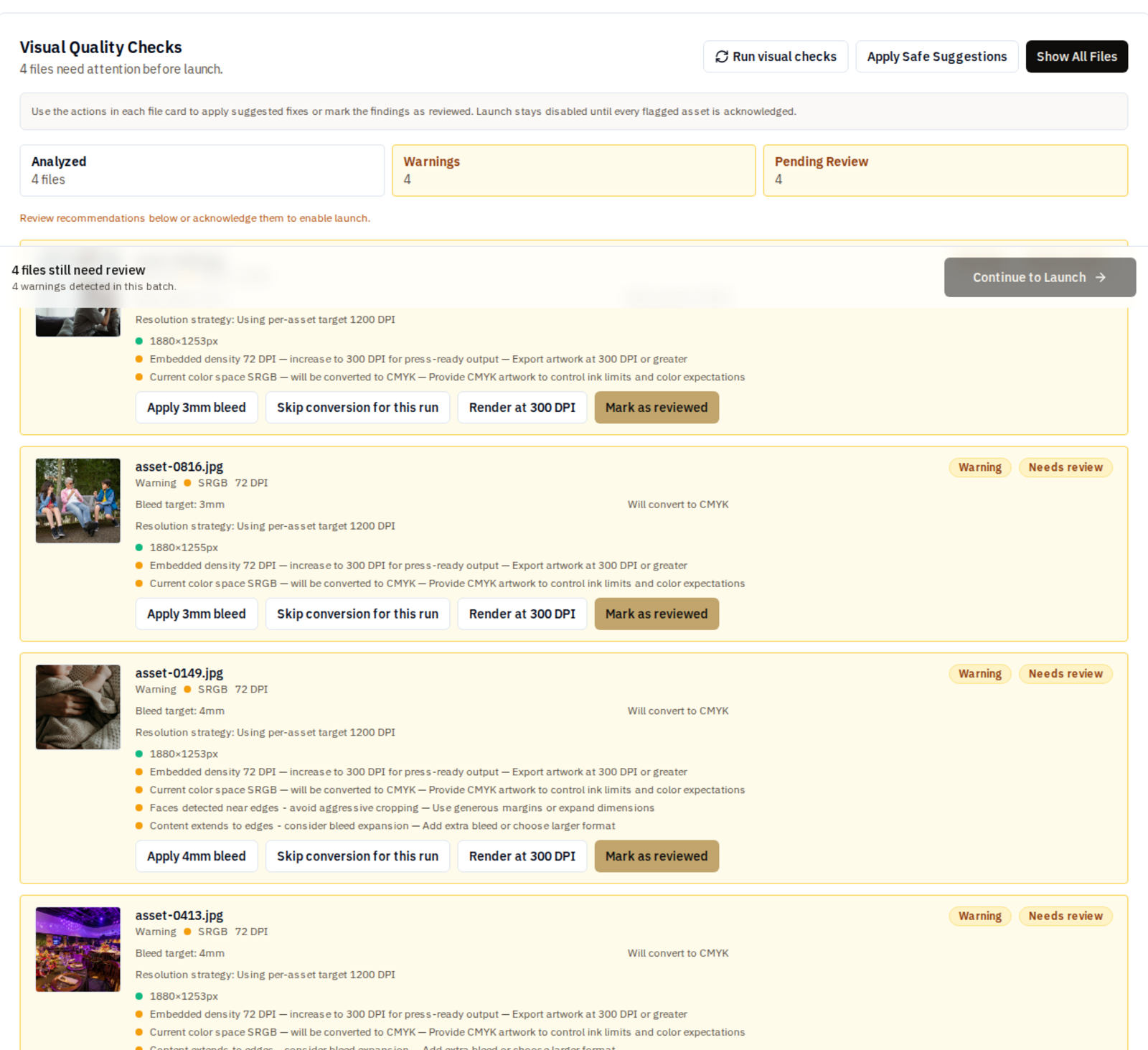
The review surface keeps the operator in the loop while making the important checks visible: resolution, bleed, colour handling, content near edges, and artwork that should be treated with more care.
Changeover
Built around the production desk already in place.
New print systems fail when they ask the floor to become someone else’s demo workflow. Vallopress is scoped from the job ticket outward: columns, file names, proofing habits, colour assumptions, hot folders, and the review points operators already trust.
- Keep the job sheet format where possible.
- Map existing CSV columns during setup.
- Bring current artwork and colour profile constraints into the review.
- Tune the exception rules around the way the production desk already works.
Deployment
Scope Vallopress around the way your operation actually runs.
Share the files, queues, constraints, and review points that define your floor. We will map what is real today, what should be automated, and what should stay in operator review.