Nothing reaches the press unchecked.

Controlled artwork intake, preflight review, and batch output for print floors handling customer-supplied files.

Imports job sheets and customer-supplied artwork, checks every file for production risks, and turns repeat preflight work into operator-ready guidance. Built for custom and non-template work where bleed, die lines, DPI, colour profiles, and queue handling all matter.

Production controls

IntakePDF / PNG / TIFF / CSV / asset bundles
ReviewDPI, bleed, text, face, and edge-risk findings
OutputICC-aware CMYK files and packaged batch output
DeploymentCloud, private, or on-premises scope

Live Review State

Review findings before they become production mistakes.

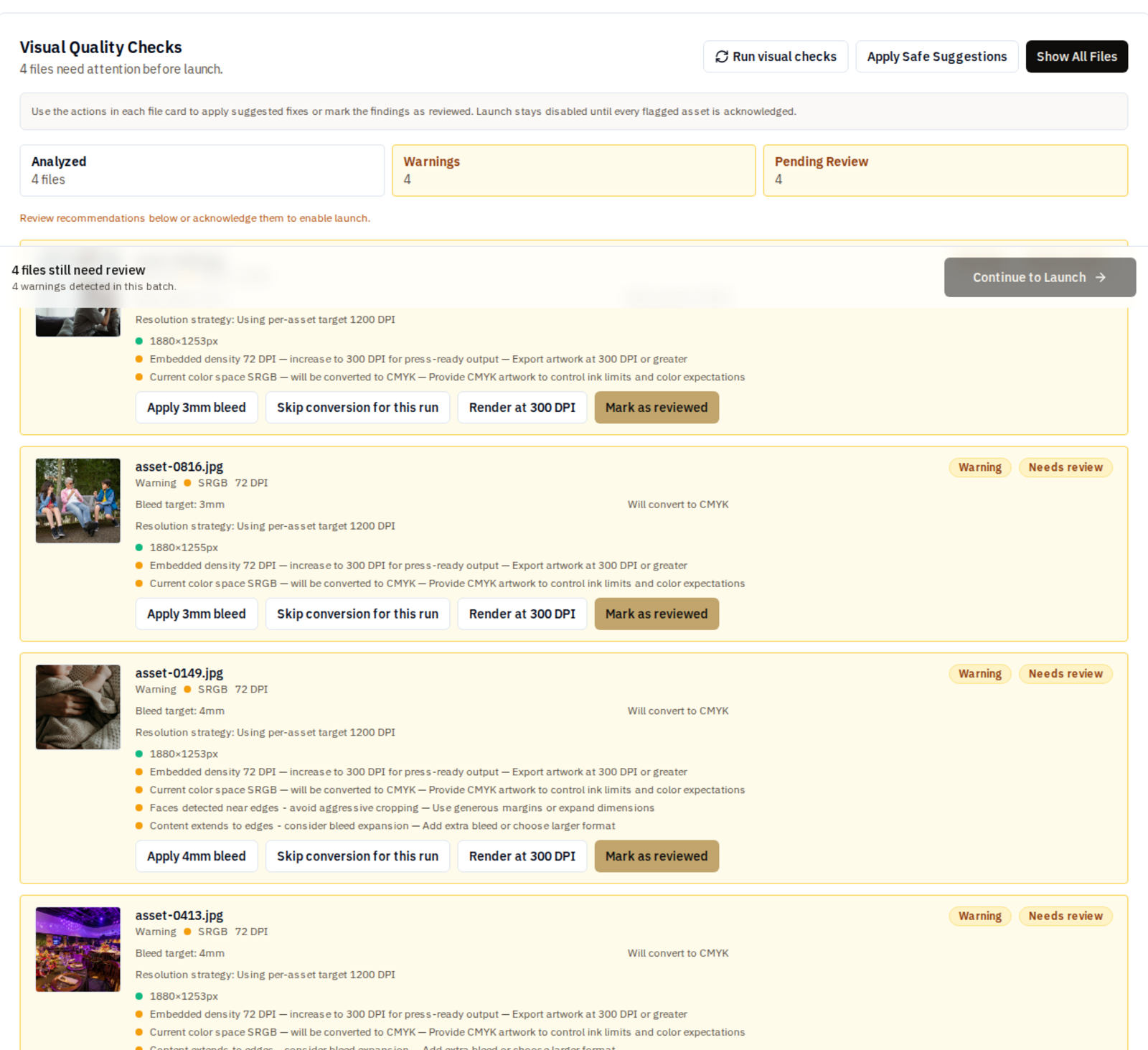
Vallopress keeps the operator in the loop while making the important checks visible: resolution, bleed, colour handling, content near edges, and artwork that should be treated with more care.

Per-file DPI recommendations
Bleed and edge-risk findings
CMYK conversion context
Operator acknowledgement before launch
Vallopress review screen showing DPI, bleed, CMYK, and edge-risk recommendations before launch
A live Vallopress review state after checks have run across a batch. Approved work can then move into production output for the configured path.

Production Flow

From artwork intake to checked output.

Intake

Job sheets, artwork, and production constraints arrive together.

CSV job data, asset bundles, and PDF/PNG/TIFF files are handled as a batch instead of one-off hand checks.

Review

Preflight flags the work an operator actually needs to inspect.

DPI suitability, bleed risk, edge faces, text risk, colour profile, and cut-line context are surfaced as reviewable findings.

Output

Approved jobs move into repeatable production files.

Operators get fewer rebuilds, clearer exception handling, and output packages configured around the floor rather than a generic workflow.

Technical Posture

Configured around the files, queues, and review points on the floor.

Vallopress starts with the production path already in place: asset formats, queue rules, colour constraints, handoff points, and the exceptions operators need to see before a job is released.

Inputs
PDF, PNG, TIFF, CSV job data, asset bundles
Review signals
DPI suitability, content region, edge faces, text risk, bleed and cut-line context
Colour handling
CMYK conversion, ICC-aware output, deployment-specific profile handling
Output posture
Production PDFs and packaged batch output configured around the print workflow
Deployment
Cloud, private, or on-premises deployment scoped to the operation
Integration path
Hot-folder, RIP, and production handoff rules mapped during deployment

Vectrari Technology

Visual checks that make preflight review more specific.

Vallopress uses Vectrari technology as the visual review layer inside the system. The point is not to auto-approve production files; it is to surface the risks that deserve attention before an operator signs off the job.

Content region

Identifies the meaningful artwork area so reviews focus on what will actually matter on the finished piece.

Face proximity

Flags faces and people near trim, bleed, or cut paths where an ordinary bounding-box check can miss the production risk.

Text risk

Detects text-bearing regions so operators can review small type, edge safety, and resolution suitability before output.

DPI mapping

Combines visual signals with local detail analysis to recommend where 600, 1200, or 2400 DPI handling is warranted.

Changeover

Built around the production desk already in place.

New print systems fail when they ask the floor to become someone else’s demo workflow. Vallopress is scoped from the job ticket outward: columns, file names, proofing habits, colour assumptions, hot folders, and the review points operators already trust.

  • Your job sheet format stays the starting point.
  • Map existing CSV columns during setup.
  • Bring current artwork and colour profile constraints into the review.
  • Tune the exception rules around the way the production desk already works.

Deployment

Scope Vallopress around the way your operation actually runs.

Vallopress earns its keep where customer-supplied files still need manual checking before production. If most of your work arrives through fixed templates or a controlled storefront, you probably do not need it yet.

Share the files, queues, constraints, and review points that define your floor. We will map what is real today, what should be automated, and what should stay in operator review.

Vallopress | Preflight Review and Batch Output for Print Floors